Time-blocking feels like the “new thing” in productivity circles, but it’s really been a concept for years; I remember seeing Richard Branson talk about how everything in his day is scheduled years ago. Cal Newport and David Sparks have both been advocates, and it’s something I’ve been doing off and on.
One thing I find that’s really important is that I need to schedule in some breaks or down time. Without that, it’s easy to get off track and harder to get back to task. Having some time scheduled to check email, or to relax after a big meeting helps me trust the system. A little slack in the system helps me flex and absorb the small things that pop up in the day; an “admin” block of a half hour or fourty-five minutes can chew through a lot of small tasks.
Where timeblocking really makes a difference for me is cranking out presentations or finished goods. On the maker/manager scale, I’m very definitely a manager in most of my time. If I go back-to-back on meetings all the time, I never actually have time to work on a presentation or an agenda, and I definitely find that 90 minutes can be enough time to really create a draft or dig into data in a way that 3 30 minute sessions can’t compare to.
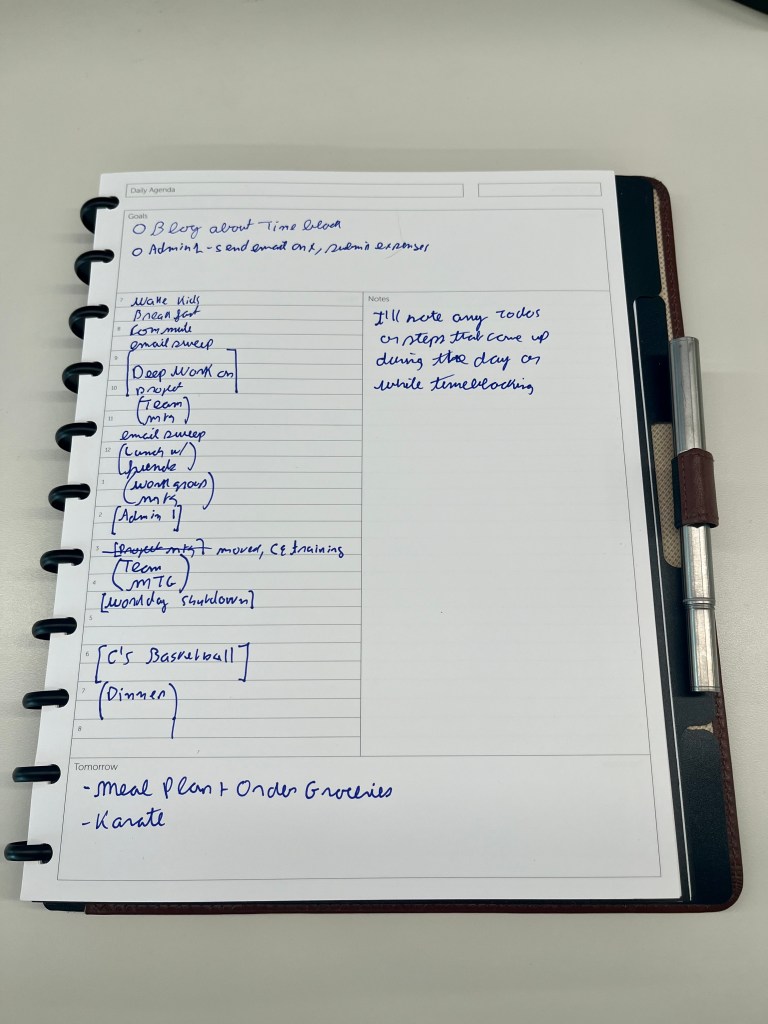
I have bounced back and forth between doing timeblocking digitally and using analog ever since I first read about the time bar concept in Bullet Journaling. At one point, I had a special “clock” notebook that I tried. What I’ve found its that: digital is easier, but analog “sticks” more throughout the day. At the same time, if I can’t see it, it doesn’t really matter enough to me; this meant that time blocking on the Kindle Scribe didn’t work out – I never went back to that PDF while taking other notes etc.
What I’m doing now is making the major blocks on my calendar in outlook, so that I don’t get double booked. I don’t have much granularity there, most of them are just “work block” that I add a day or two before. Then I setup actual written time blocks in my circa planner, which I can fold back and leave on my desk to see during the day. I can also tuck in my Kindle Scribe and carry it all together. When I’m doing with the day, I just pop it out, and put it back in the sections, and once a month, I take all those out, review what I did and file them.
All in all, it give me some leverage.
 Leveraged Intention